




 Sign in


 Profile
 Signout
COMEDK Seat Allotment Result 2026 for Round 1 Today; Check Schedule and Next Steps
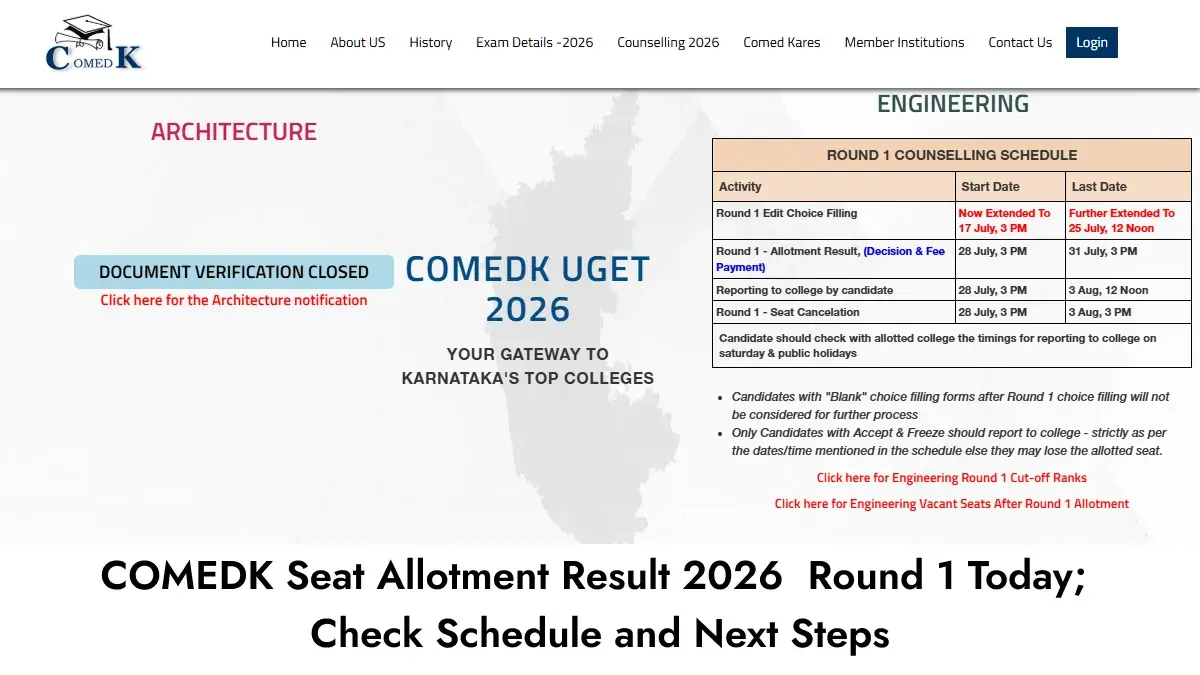


Seat allotment result for COMEDK UGET 2026 Round 1 will be declared today, i.e., July 28, 2026, by Consortium of Medical, Engineering and Dental Colleges of Karnataka (COMEDK).
Allotment of seats link will be made available from 3 PM on the official website at comedk.org. Students can verify their seat allotment result with the help of application serial number or user ID and password.
It will consist of all the necessary information regarding allotment based on COMEDK Rank of the candidates along with choices and category and availability of seats.
How to Check COMEDK Round 1 Seat Allotment Result
- Go to the official website of COMEDK at comedk.org.
- Navigate to the engineering login page.
- Enter your application number or username/password.
- Go to the “Decision Making” section.
- Look for the Round 1 allotment details.
- Find out the allotted college, course, preference number, category, and fee details.
Students allotted seats have to choose their choice of decision making before the deadline. The final date for making decisions is July 31, 2026, up to 3 PM.
General Merit and Kalyana Karnataka Region students will both participate in Round 1. Students not allotted any seats or wanting to opt for better choices can take part in the following rounds of counseling.
There will be four rounds of counseling conducted by COMEDK. Schedule for Round 2 will be announced after the end of Round 1 admission process.
----
👉 JEE Main & Advanced Study Material



 Home
Home
 Quiz
Quiz
 Short News
 Web Story
 Get latest Exam Updates







