


 Sign in


 Profile
 Signout

JEE Main 2027 BPlanning Paper: Questions, Marking Scheme and Exam Mode


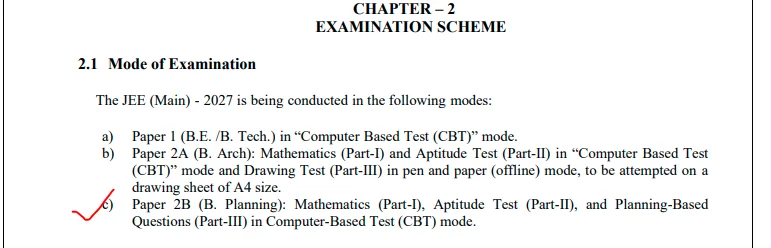
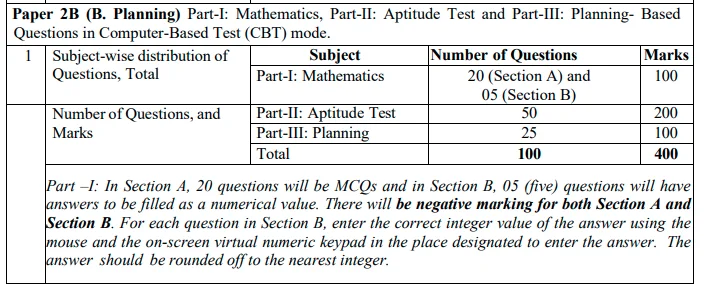
JEE Main 2027 BPlanning Paper Pattern: It has been confirmed by NTA that Paper 2B for admission to B.Planning would comprise of 100 questions with a total of 400 marks. These questions include Mathematics, Aptitude test, and Planning based questions.
The examination would take place only in CBT form for three hours. For students who are preparing for Paper 2B, JEE Main BPlanning Sample Papers would be useful in getting familiar with the format of questions.
JEE Main 2027 BPlanning Exam Pattern: Questions and Marks
According to the JEE Main 2027 Information Bulletin, Paper 2B has three sections.
| Section | Number of Questions | Marks |
| Mathematics | 25 | 100 |
| Aptitude Test | 50 | 200 |
| Planning-Based Questions | 25 | 100 |
| Total | 100 | 400 |
All sections are compulsory and conducted online.
JEE Main 2027 BPlanning Mathematics Pattern
Mathematics section consists of 25 questions, which include the following:
- Section A: MCQs – 20 questions
- Section B: Numerical Value based Questions – 5 Questions
Here, students need to enter answers via the virtual keyboard, and the answers should be rounded off to the nearest integer as specified by NTA.
Both the sections have negative marking.
JEE Main 2027 BPlanning Aptitude and Planning Sections
Aptitude Test comprises of 50 Multiple Choice Questions for 200 marks. It tests the candidates’ visual comprehension, spatial sense, observation skills and general awareness related to planning and design.
Planning carries 25 Multiple Choice Questions for 100 marks. The questions are from planning-related knowledge and concepts mentioned in the syllabus.
Drawing test is not part of B.Planning Paper 2B.
JEE Main 2027 BPlanning Marking Scheme
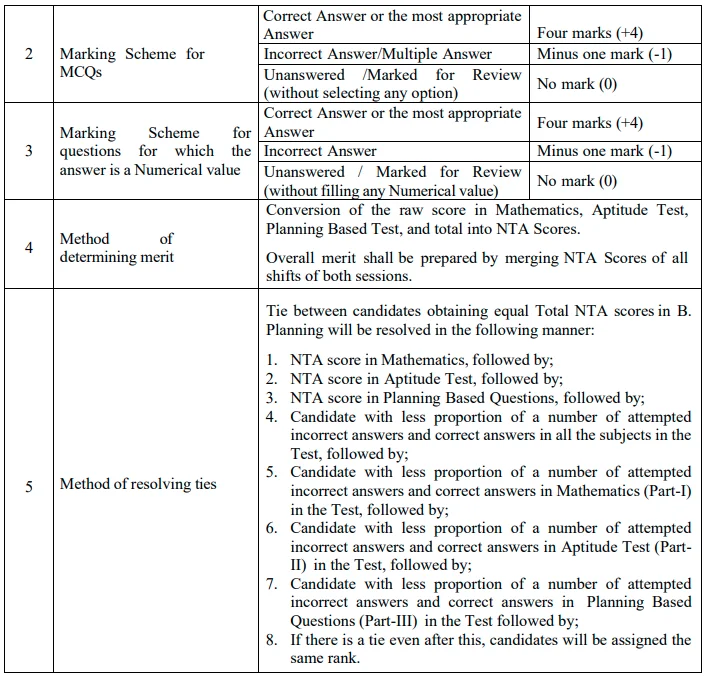
NTA follows the same marking rules for MCQs and numerical-value questions.
| Response | Marks |
| Correct answer | +4 |
| Incorrect answer | −1 |
| Unanswered question | 0 |
Negative marking applies to both Section A and Section B of Mathematics, as well as the Aptitude and Planning sections.
JEE Main 2027 BPlanning Exam Mode and Duration
| Particulars | Details |
| Paper | Paper 2B (B.Planning) |
| Examination Mode | Computer-Based Test |
| Duration | 3 Hours |
| Total Questions | 100 |
| Maximum Marks | 400 |
| Question Types | MCQs and Numerical-Value Questions |
| Drawing Test | Not Included |
Students who apply for both B.Arch and B.Planning should check the separate examination duration and instructions for that paper combination.
How to Prepare for JEE Main 2027 BPlanning Paper
Candidates must prepare in Mathematics and also solve questions based on aptitude and planning.
Aptitude Test contributes 200 out of 400 marks and hence needs preparation.
Candidates are advised to go by the official Paper 2B syllabus rather than preparing for B.Arch Drawing Test.
More details about the syllabus and exam pattern can be found on jeemain.nta.nic.in.
---------
👉 Also Read - JEE Main 2027 Registration Begins: How to Apply, Eligibility, Fee and Exam Dates
👉 Also Read - JEE Main 2027 Photo and Signature Guidelines: Check Size, Format, Pixels and Upload Steps
👉 Also Read - JEE Main 2027: How to Solve Difficult Questions Without Losing Time
👉 Also Read - JEE Main 2027 Attempt Limit: Check Eligibility, Age and Rules
👉 Also Read - JEE Main 2027 Registration: Check Application Dates, Documents and Eligibility
👉 Also Read - JEE Main Application Form 2027: Common Mistakes to Avoid While Filling the Form
👉 Also Read - JEE Main 2027 Session 1 Exam Dates Announced by NTA: Check Complete Schedule




 Home
 Quiz
 Short News
 Web Story
 Get latest Exam Updates