


 Sign in


 Profile
 Signout

JEE Main 2027 Late Registration Ends Today: Final Deadline and Payment Rules
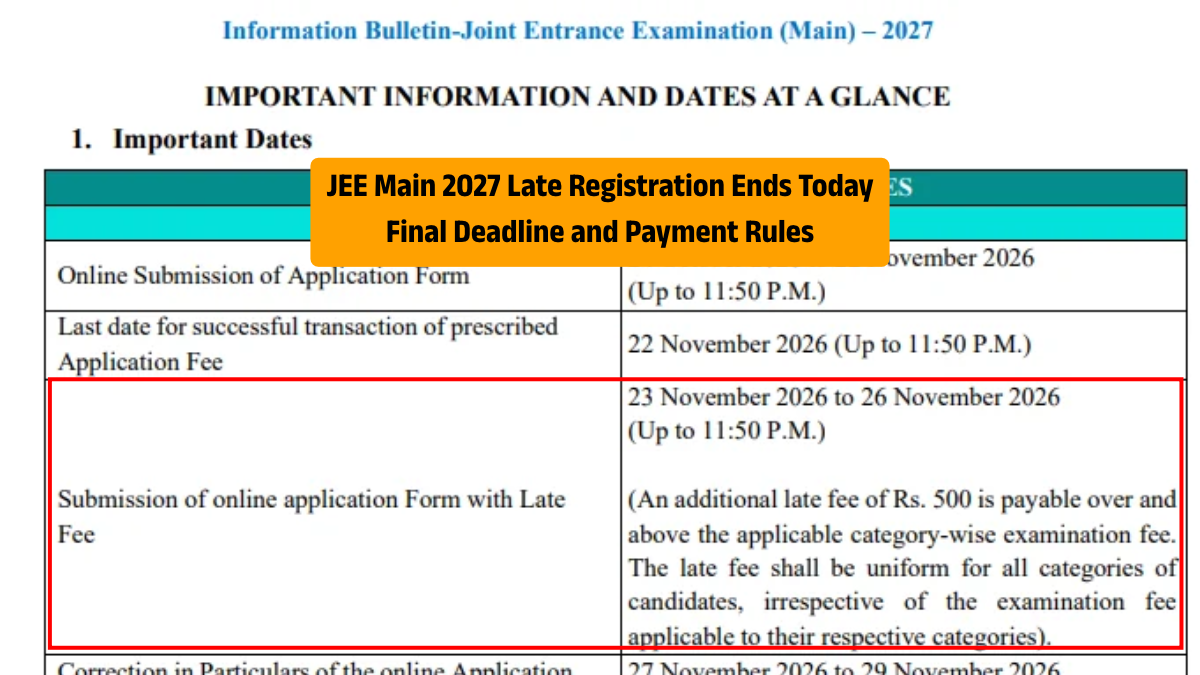

JEE Main 2027 Late Registration: The National Testing Agency (NTA) will close the application window for Session 1—with a late fee—today, November 26, 2026, at 11:50 PM. The applicants who failed to meet the deadline of regular registration must apply through the official website www.jeemain.nta.nic.in and pay the requisite fee.
It is mandatory for the students to pay an extra fee of Rs. 500 along with the exam fee.
👉 Direct Link to Apply JEE Main 2027 Registration
JEE Main 2027 Registration: Important Dates
| Event | Date |
| Regular Registration Closed | November 22, 2026 |
| Late Registration Started | November 23, 2026 |
| Final Registration Deadline | November 26, 2026, 11:50 PM |
| Additional Late Fee | ₹500 |
| Application Correction Window | November 27–29, 2026 |
| Session 1 Exam Dates | January 20–24 and 28, 2027 |
JEE Main 2027 Late Registration: How to Apply Today
The candidates who have not applied for the examination can do the following things:
- Go to the website – jeemain.nta.nic.in.
- Go to the link for the Application of JEE Main 2027 Session 1.
- Complete the registration and identify themselves.
- Enter all the required information about themselves and examinations.
- Attach their photograph, signature, and other documents.
- Pay the examination fees along with the penalty of ₹500.
- Take the confirmation page after the payment.
JEE Main 2027 Late Fee Payment Rules
The additional ₹500 late fee applies to candidates submitting their applications during the November 23–26 window.
The fee depends upon the type of candidate, i.e., male or female along with the category of candidate. Payment can be done online by the candidates through the various facilities available from NTA through online payment options such as UPI, debit card, credit card, and net banking.
Submission of bank debit does not imply that the application has been submitted successfully. Confirmation page would be provided by NTA once the fees are paid for examination.
If there is no confirmation page, candidates would first need to check the status of payment made through the bank or payment gateway. If the payment is successful but the same is not displayed on the portal, candidates can approach NTA.
What Happens After the November 26 Deadline?
NTA has scheduled the JEE Main 2027 application correction window from November 27 to 29, 2026.
Only permitted application fields can be edited during this period. The correction window does not allow students to submit a new application after registration closes.
Candidates should complete their applications before 11:50 PM today and save the confirmation page for future reference.
Official Website: https://jeemain.nta.nic.in/
NTA Helpdesk: 011-40759000 / 011-69227700
Email: jeemain@nta.ac.in
Official Source: JEE Main 2027 Information Bulletin and NTA registration instructions.
---------
👉 Also Read - JEE Main 2027 Photo and Signature Guidelines: Check Size, Format, Pixels and Upload Steps
👉 Also Read - JEE Main 2027: How to Solve Difficult Questions Without Losing Time
👉 Also Read - JEE Main 2027 Attempt Limit: Check Eligibility, Age and Rules
👉 Also Read - JEE Main 2027 Registration: Check Application Dates, Documents and Eligibility
👉 Also Read - JEE Main Application Form 2027: Common Mistakes to Avoid While Filling the Form
👉 Also Read - JEE Main 2027 Session 1 Exam Dates Announced by NTA: Check Complete Schedule



 Home
 Quiz
 Short News
 Web Story
 Get latest Exam Updates