




 Sign in


 Profile
 Signout
COMEDK Counselling 2026 Revised Schedule Released; Round 1 Seat Allotment on July 28
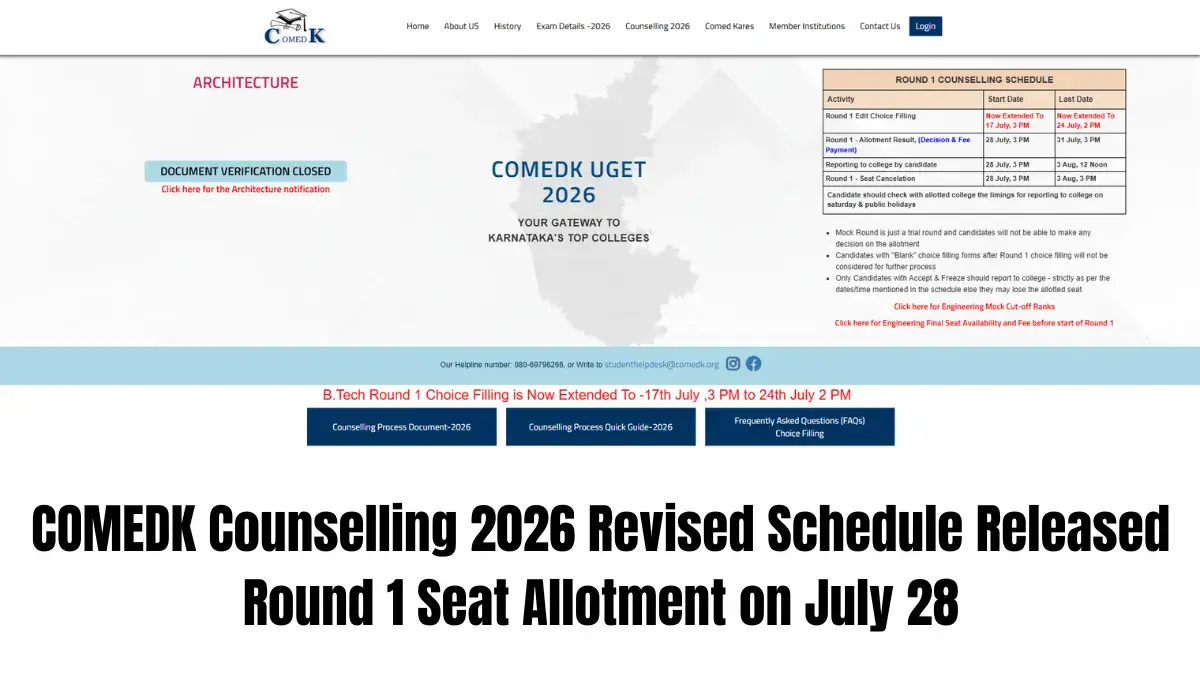

The Consortium of Medical, Engineering and Dental Colleges of Karnataka (COMEDK) has published the COMEDK Counselling 2026 schedule (Round 1) in its revised format. The candidates who will appear for the counselling procedure are requested to visit the official website comedk.org and view the revised schedule.
The COMEDK had cancelled the previous schedule due to extension of the choice editing period of Round 1. As per the revised schedule, the COMEDK 2026 Round 1 Seat Allotment Result will be declared on July 28, 3 PM.
👉 Check Now: COMEDK Counselling 2026 Revised Schedule
The candidates allotted with the seat should make their allotment decision and make the necessary payment of the admission fee till July 31, 3 PM. The candidates accepting their allotted seat will also need to report to their respective college.
Revised COMEDK Counselling 2026 Schedule
Candidates can check the revised COMEDK UGET 2026 Round 1 counselling dates below.
| Event | Revised Date |
|---|---|
| Choice editing after mock allotment | July 17, 3 PM to July 24, 2026, 2 PM |
| Round 1 seat allotment result | July 28, 2026, at 3 PM |
| Seat acceptance and fee payment | July 28, 3 PM to July 31, 2026, 3 PM |
| Reporting to allotted colleges begins | July 28, 2026, at 3 PM |
| Seat cancellation window | July 28, 3 PM to August 3, 2026, 3 PM |

COMEDK 2026 Choice Editing
The editing process for the first round selection of COMEDK 2026 is ongoing. Students have till 2 PM on July 24, 2026, to make changes and shuffle around their preferences of colleges and courses.
Students must do so by the deadline because choices submitted after the deadline will not be considered.
How to Fill COMEDK UGET 2026 Choices
The candidates have to follow the following guidelines to make entries in COMEDK UGET 2026:
Step 1: Go to the official website of COMEDK at comedk.org.
Step 2: Login through your application number/user id and password.
Step 3: Enter the “Option Entry” module from the candidate’s dashboard.
Step 4: Filter colleges and streams on the basis of institute name/course/locations.
Step 5: Enter your choice of colleges and streams.
Step 6: Sequence the options according to your priority.
Step 7: Make the final submission of all entries.
Step 8: Ensure to make submissions or modifications before July 24 by 2 PM.
COMEDK UGET 2026 Choice-Editing Window Open Until July 24
The COMEDK UGET 2026 Round 1 choice editing window will be open till July 24, 2026, 2 PM. Candidates can modify their college preferences, program and department choices via logging into the official counseling website.
In order to use the choice-editing service, candidates would require their application sequence number and password.
As per COMEDK, candidates should fill the choice form wisely as they have to be careful about it. The candidates who do not fill the choice form will not get selected in the seat allotment round.
Candidates Should Review Mock Allotment Results
A candidate must make an assessment of the possibility of securing admission to his/her choice of college or course based on the COMEDK provisional result. One can look at past years’ cutoffs prior to making any selection.
Careful planning regarding college/course preferences might boost one’s chances of securing a preferred admission in the first round of counseling.
What to Do After COMEDK Round 1 Seat Allotment
Result of COMEDK 2026 Round 1 seat allotment will be announced on 28th July at 3 PM. All the candidates can log in to the counselling portal for checking their seat allotment status.
Once the result is checked, allotted candidates have to take their decision regarding the acceptance of their seat and also pay the seat acceptance fees by 31st July at 3 PM. The admitted candidates have to also report at the allotted college.
The facility for cancelling seats will be available between 28th July at 3 PM and 3rd August 2026 at 3 PM.



 Home
Home
 Quiz
Quiz
 Short News
 Web Story
 Get latest Exam Updates







