




 Sign in


 Profile
 Signout
GATE 2027 Registration Last Date Tomorrow Without Late Fee: Check DigiLocker Login Fixes
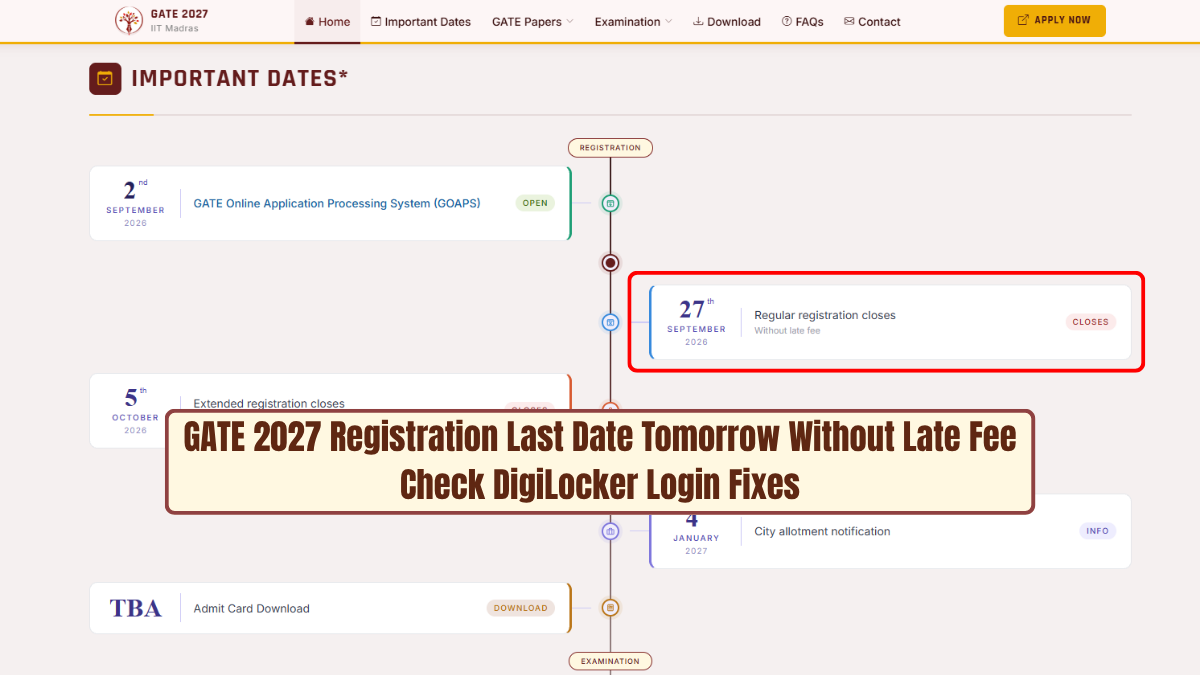


The regular registration deadline for the GATE 2027 exam is September 27, 2026. Students who haven't filled out the form till then can apply even without paying the late fee.
For those students applying between September 28, 2026, to October 5, 2026, will have to pay the late fee along with the application fees. The amount for the late fee is ₹500 per paper.
👉 Apply Link: GATE 2027 Registration
This year GATE 2027 registration process will be held via the GOAPS portal. A few students have faced problems while completing the form regarding their DigiLocker login, document fetch and verify.
To ease the registration process, IIT Madras has made some changes in the same. Now students can fill out the form even if their DigiLocker is not verified completely. The document verification process will take place later during the scrutiny period.
Those students having issues with DigiLocker must ensure their consent validity period is set for 3 years. They are supposed to upload documents under the folder called "GATE2027" in their DigiLocker. Category documents are not required for general and OBC-NCL and EWS candidates.
GATE 2027 Application Fee Details
| Candidate Category | Regular Fee (By September 27, 2026) | Late Fee Window (By October 5, 2026) |
| Female / SC / ST / PwD Candidates | ₹1,000 per paper | ₹1,500 per paper |
| Other Candidates | ₹2,000 per paper | ₹2,500 per paper |

Steps to Fix GATE 2027 DigiLocker and GOAPS Login Errors
Here are some guidelines for candidates who encounter issues while registering for GATE 2027:
- Candidates have to log in separately to DigiLocker by visiting the official site or the app. Ensure that the phone number connected with Aadhaar is verified before linking it to GOAPS.
- While logging in through GOAPS, select the profile having a blue tick mark in DigiLocker for successful authentication.
- Choose the period of DigiLocker consent as 3 years in case of giving consent to GOAPS for accessing the documents.
- Create a folder in DigiLocker as GATE2027 and upload the required certificates if needed. General, OBC-NCL and EWS categories don't require uploading category certificates.
- If GOAPS reflects that the email ID is already registered, change the registered email in DigiLocker settings and then try logging in.
- Perform the mandatory face verification process using a good-quality camera of the device. Ensure that there is proper lighting in the background during verification.
Candidates must complete the registration for GATE 2027 on time.
-------
👉 GATE Study Material
GATE 2027 complete study material. Download full notes, previous year papers with solutions, mock tests and updated syllabus for all branches and subjects here.
| GATE Study Material | |
| Gate Full Study Material | Gate Previous Year Question Paper |
| Gate Mock Test | Gate Syllabus 2027 |



 Home
Home
 Quiz
Quiz
 Short News
 Web Story
 Get latest Exam Updates







