




 Sign in


 Profile
 Signout
JEE Main 2027 Registration Login Not Working? Common Errors and Possible Fixes

JEE Main 2027 Registration Login Not Working? Some applicants have reported technical problems while accessing the registration portal, creating passwords and completing DigiLocker verification.
Two errors reported by students include "Your browser is not supporting password encryption" and "DigiLocker authentication is unsuccessful."
The National Testing Agency (NTA) opened JEE Main 2027 Session 1 registration on October 24, 2026. Candidates can apply through the official website, jeemain.nta.nic.in, until November 22 without a late fee.
Here are the commonly reported errors and some troubleshooting steps applicants can try.
JEE Main 2027 Registration: Important Dates
| Event | Date |
| Registration Started | October 24, 2026 |
| Last Date Without Late Fee | November 22, 2026 |
| Late Registration Window | November 23–26, 2026 |
| Additional Late Fee | Rs 500 |
| Application Correction Window | November 27–29, 2026 |
JEE Main 2027 Password Encryption Error
Some students have reported receiving the following message while creating their registration password:
"OPERATION CAN NOT BE PERFORMED. YOUR BROWSER IS NOT SUPPORTING PASSWORD ENCRYPTION."
The message prevents applicants from continuing with the registration process.
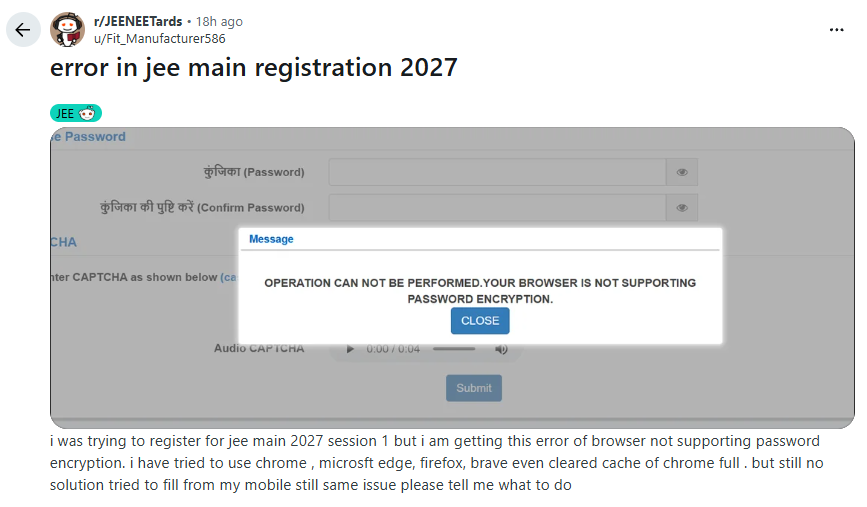
Caption: A JEE Main 2027 applicant reports a password encryption error during registration. Source: Reddit/user-reported screenshot.
Possible Fixes for Password Encryption Error
Students facing this error can try the following steps:
-
Update your browser: Use the latest version of Chrome, Firefox or Microsoft Edge.
-
Enable JavaScript: Check that JavaScript is enabled in the browser settings.
-
Clear browser data: Clear cached site data and cookies, then reopen the official registration portal.
-
Disable extensions temporarily: Browser extensions may sometimes interfere with website functions.
-
Try another device: Check whether the issue continues on another computer or mobile device.
-
Contact NTA: If the error appears across multiple browsers and devices, report it to the official helpdesk.
These are general troubleshooting suggestions, not confirmed fixes issued by NTA. The error may also occur because of a portal-side technical problem.
JEE Main 2027 DigiLocker Authentication Unsuccessful
The other problem noted by candidates is failure of the DigiLocker login in the process of registration.
According to some, the error comes after logging into their DigiLocker account or going back to the NTA portal.
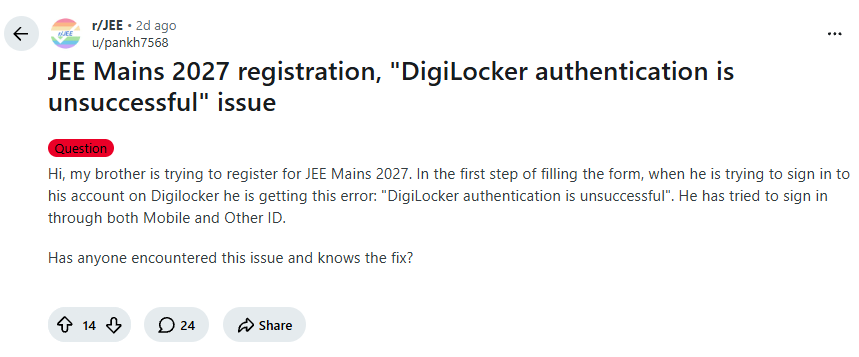
Caption: A student reports unsuccessful DigiLocker authentication while registering for JEE Main 2027. Source: Reddit/user-reported screenshot.
What to Do If DigiLocker Verification Fails?
These are some methods that applicants can attempt:
- They can confirm if their DigiLocker account can be accessed via the official DigiLocker site.
- They can confirm if their name, date of birth, and other identification information correspond to those from their official documents.
- They can complete any pending identification process from DigiLocker.
- They can begin a new login session via the official JEE Main site.
- They should use another form of identification if it is possible from the NTA site.
If the identification process fails, applicants can contact DigiLocker support or NTA helpdesk.
Students are not supposed to make multiple JEE Main registrations to avoid the login problem.
JEE Main 2027 Registration Login Not Working? Follow These Steps
In case there are issues with the JEE Main registration site not loading or failure to log in:
- Log on to the official website http://jeemain.nta.nic.in/.
- Click the “Apply for JEE Main 2027 Session 1” button.
- Make sure that you have a proper connection to the internet and the correct settings on the web browser.
- Ensure that the login credentials used are accurate, along with the instructions on the portal.
- Save an image showing the issue if it persists.
Reach out to the official help desk with the error and the time when it occurred.
JEE Main 2027 Login Problem: NTA Helpline
Candidates unable to complete registration can contact NTA through the following official channels.
| Contact Details | Information |
| Official Website | jeemain.nta.nic.in |
| NTA Helpline | 011-40759000 |
| Additional Helpline | 011-69227700 |
| jeemain@nta.ac.in | |
| DigiLocker Support | support.digilocker.gov.in |
Ensure you include the error message, device information, browser used and stage at which the registration process failed in your report. However, passwords and OTP codes should not be included in the report.
Note: The NTA has not made any official statement to confirm the presence of the above mentioned two issues to all students.
--------
👉 Also Read - JEE Main 2027 Registration Begins: How to Apply, Eligibility, Fee and Exam Dates
👉 Also Read - JEE Main 2027 Photo and Signature Guidelines: Check Size, Format, Pixels and Upload Steps
👉 Also Read - JEE Main 2027 Aadhaar Update: How to Fix Name Mismatch Online, Check Steps
👉 Also Read - JEE Main 2027: How to Solve Difficult Questions Without Losing Time
👉 Also Read - JEE Main 2027 Attempt Limit: Check Eligibility, Age and Rules
👉 Also Read - JEE Main 2027 Registration: Check Application Dates, Documents and Eligibility
👉 Also Read - JEE Main Application Form 2027: Common Mistakes to Avoid While Filling the Form
👉 Also Read - JEE Main 2027 Session 1 Exam Dates Announced by NTA: Check Complete Schedule
👉 JEE Main & Advanced Study Material




 Home
Home
 Quiz
Quiz
 Short News
 Web Story
 Get latest Exam Updates







