




 Sign in


 Profile
 Signout
JEE Main 2027 Application Fee Payment Failed? What Candidates Should Do


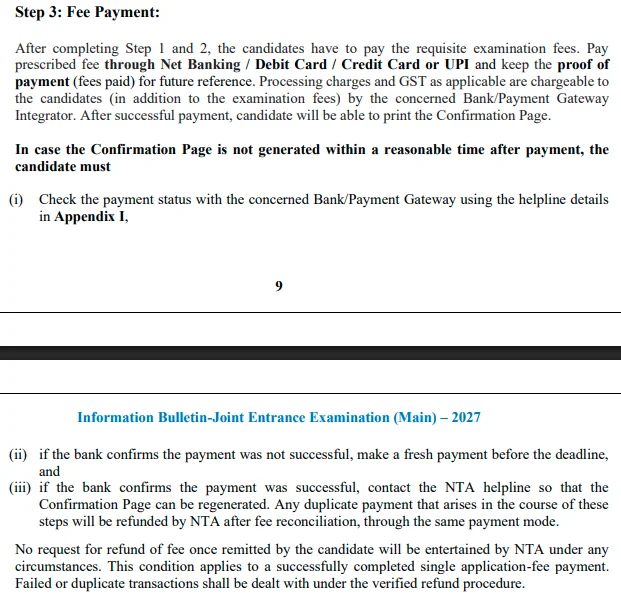
JEE Main 2027 Application Fee Payment Failed? In case there is a deduction of money from your bank account but the application fee is yet not marked paid, the first thing you need to do is check the status of the transaction.
As per the JEE Main 2027 Information Bulletin, candidates need to get in touch with their respective banks or payment gateways if the confirmation page is not generated by them. If the payment is successful but not showing up in the application portal, they need to inform NTA.
JEE Main 2027 Payment Failed: What to Do First?
This should be done if there has been a deduction of your fee for the JEE Main 2027 exam form but you still haven’t filled out the form.
- Go to the website, jeemain.nta.nic.in.
- Login to your account using your application number and password.
- See whether the payment of the fee has been made or not.
- Find the “download confirmation page” option.
- If the payment has not been made, talk to the bank or payment gateway.
If the bank has verified that the payment was successfully made but the portal hasn’t reflected that, talk to the NTA helpline.
JEE Main 2027 Payment Status: How to Check If Your Form Is Complete
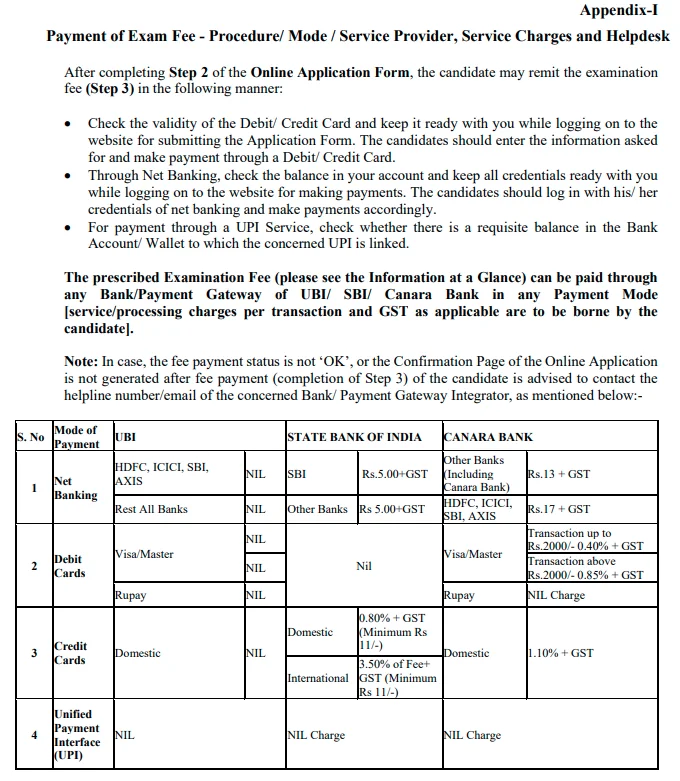
The JEE Main 2027 application is considered successfully submitted only after NTA receives the prescribed examination fee.
| Payment Status | What Candidates Should Do |
| Payment successful and confirmation page available | Download and save the confirmation page |
| Money deducted but payment pending | Verify the transaction with the bank or payment gateway |
| Payment failed | Make a fresh payment before the deadline after confirming the failed transaction |
| Bank confirms success but confirmation page is missing | Contact the NTA helpdesk |
Candidates should save both digital and printed copies of the confirmation page for future reference.
JEE Main 2027 Fee Deducted but Confirmation Page Not Generated
In case the confirmation page is not generated after the specified period post-payment, the process adopted by NTA is as follows:
- Step 1: Approach the respective bank or payment gateway for verification of the transaction.
- Step 2: In case the transaction is found to be unsuccessful, make a new payment before the submission deadline.
- Step 3: In case the transaction is confirmed, then approach NTA for resolution of the matter and generation of confirmation page.
If this matter cannot be sorted out, then the candidate is allowed to make another payment. However, the candidate must go through the proper verification and complaint process.
JEE Main 2027 Payment Failed: Bank and Payment Gateway Helpline
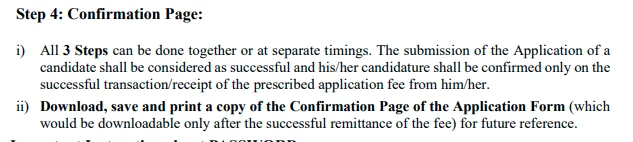
Candidates experiencing payment issues should contact the bank or payment gateway used for the transaction.
| Bank / Payment Gateway | Contact Details |
| State Bank of India (SBI) | Sbi.00727@sbi.co.in, 011-26391804 |
| SBI Customer Care | 1800112211 |
| Canara Bank / BillDesk | pgsupport@billdesk.com |
| Canara Bank | dssrosdel@canarabank.com |
| Union Bank of India / BillDesk | nodal@billdesk.com |
These contact details are listed in Appendix I of the JEE Main 2027 Information Bulletin. Candidates should check the official website for any updates.
JEE Main 2027 Payment Complaint: Details Required
Candidates raising a payment complaint should provide the following information:
- JEE Main 2027 application number
- Name of the bank or payment gateway
- Transaction date and time
- Transaction ID or reference number
- Bank reference number
- Screenshot or proof of payment
Do not share your banking password, OTP, card PIN or other confidential security details.
NTA JEE Main 2027 Helpdesk
| Contact | Details |
| Official Website | https://jeemain.nta.nic.in/ |
| jeemain@nta.ac.in | |
| Helpline | 011-40759000 / 011-69227700 |
Will NTA Refund Duplicate JEE Main 2027 Payments?
Yes. As per the JEE Main 2027 Information Bulletin, any duplicate payments made to NTA during fee issues will be refunded using the same mode of payment after the fee reconciliation process.
But the examination fee paid by a candidate who has successfully applied is non-refundable.
No specific number of days is mentioned for refunding the duplicate fee.
JEE Main 2027 Application Fee Payment Deadline
| Event | Date |
| Session 1 Regular Payment Deadline | November 22, 2026, up to 11:50 PM |
| Registration With Additional Rs 500 Late Fee | November 23–26, 2026 |
| Session 2 Regular Payment Deadline | February 3, 2027, up to 11:50 PM |
| Session 2 Late Fee Window | February 4–7, 2027 |
Candidates facing payment problems close to the deadline should contact the relevant payment provider and NTA without delay.
-----
👉 Also Read - JEE Main 2027 Registration Begins: How to Apply, Eligibility, Fee and Exam Dates
👉 Also Read - JEE Main 2027 Photo and Signature Guidelines: Check Size, Format, Pixels and Upload Steps
👉 Also Read - JEE Main 2027 Aadhaar Update: How to Fix Name Mismatch Online, Check Steps
👉 Also Read - JEE Main 2027: How to Solve Difficult Questions Without Losing Time
👉 Also Read - JEE Main 2027 Attempt Limit: Check Eligibility, Age and Rules
👉 Also Read - JEE Main 2027 Registration: Check Application Dates, Documents and Eligibility
👉 Also Read - JEE Main Application Form 2027: Common Mistakes to Avoid While Filling the Form
👉 Also Read - JEE Main 2027 Session 1 Exam Dates Announced by NTA: Check Complete Schedule
👉 JEE Main & Advanced Study Material




 Home
Home
 Quiz
Quiz
 Short News
 Web Story
 Get latest Exam Updates







