




 Sign in


 Profile
 Signout
JEE Main 2027 Photo Upload Problems: Common Errors, Size Rules and Solutions

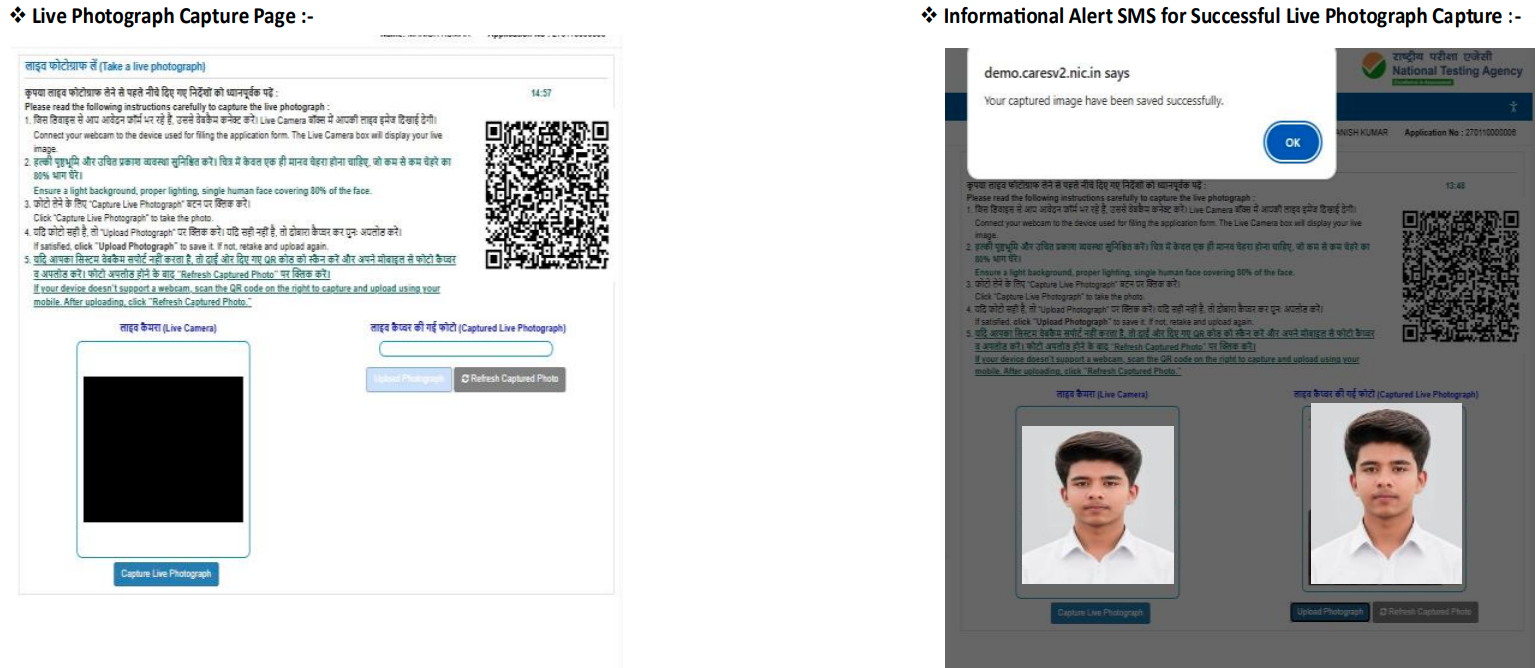
Some of the difficulties faced by candidates while applying for the JEE Main 2027 using the JEE Main Application Form are related to the capture and upload of photographs. The most common problem is that of live photo mismatch, where the photograph taken by the candidate during the registration process does not match with the one on his/her identity.
Photograph verification procedure has been introduced by NTA in JEE Main, which includes the verification of the live photograph against the identity photo and the uploaded photograph.
Do not ignore any photography error; check the camera, lighting conditions, photo format and identity before the submission of your JEE Main Application. The JEE Main 2027 Application form is now being accepted on the official portal.
JEE Main 2027 Photo Upload: Key Points
| Issue | What to Check |
| Live photo isn't captured | Camera permission, lighting and internet connection |
| Live photo mismatch | Identity photograph and personal details |
| Blurry image | Camera lens, lighting and image quality |
| Camera not working | Browser permissions or another compatible device |
| Uploaded photo rejected | Follow the photograph specifications shown on the NTA portal |
| Repeated mismatch | Contact NTA through the official helpdesk |
The NTA had previously made it mandatory for candidates to upload a passport-sized photograph with a clear view of their face including the ears, in white background. In the JEE Main notices published in the past, it was mentioned that photographs which were fabricated or generated by a computer or had an unclear image would be rejected.
Why Does the JEE Main 2027 Live Photo Mismatch Error Occur?
There could be various reasons behind photo mismatches. These include the following:
- Use of outdated identification photograph: The photograph attached to the identity information of the applicant may not match the present photograph.
- Bad lighting: Dark spots, shadows, or backlight may obstruct face recognition.
- Faulty camera placement: The face cannot be captured by the camera.
- Technical faults with camera and browser: Faults with the camera or browser or weak internet connection may disrupt the entire capturing process.
- Mismatch of identity information: Discrepancies between identity and application information might lead to further authentication of the identity.
NTA has been using live-photo matching and identity authentication as security features in the JEE Main application process.
How to Fix JEE Main 2027 Photo Upload Problems
1. Check the Identity Photograph
However, if your ID photo is outdated or no longer matches your present self, find out if your identity document needs to be updated.
Applicants who are using DigiLocker or other such systems of identity verification need to ensure that their ID is up-to-date as well. In case the system demands more verification from you, follow the instructions that were provided when you registered.
Updating an ID photo may help in certain situations but cannot guarantee that all discrepancies would be solved.
2. Improve Lighting and Camera Position
Prior to taking the picture, you should ensure that:
- You sit in an adequately lit environment.
- Your face is in a straight position and faces the camera.
- Your whole face is seen.
- No shadows or lights are casting from behind you.
- The camera lens is clean.
- You comply with the guidelines shown on the registration page.
- You do not use any photo editing tools.
As per NTA's previously stated photograph guidelines, the face must be clearly visible against a white background.
3. Check Camera and Browser Permissions
At times, the issue does not arise from the photograph itself. The issue might be related to the browser or device. Follow these tips:
- Ensure that your internet connectivity is okay.
- Allow the use of the camera if prompted.
- Update your browser.
- Relaunch your browser.
- Restart the device if necessary.
- Try another working device if the camera does not function.
- If there is a QR-code capturing method available on the application portal, try using it.
Switching devices can solve technical issues. However, it will not solve any identity photograph discrepancy issue.
What Are the JEE Main Photograph Size Rules?
Candidates must not follow the same guidelines for photograph size in JEE Main based on old information without verifying the updated guidelines for 2027.
There have been different criteria for photograph size set by NTA every year for the examination. For instance, a previous JEE Main notice mentioned that the photograph should be of passport size and in JPG/JPEG format with 10 KB to 200 KB file size, whereas there was another mention for 10 KB to 300 KB file size.
Thus, candidates filling the JEE Main 2027 application form must use the file format and size from the application portal or Information Bulletin of 2027.
When Should You Contact NTA?
In case the photo mismatch issue persists even after verifying all the above-mentioned things, get in touch with NTA via the specified support channels.
Contact details provided by NTA for JEE Main are 011-40759000 / 011-69227700 and jeemain@nta.ac.in.
Always attach a screenshot of the problem while reporting to the helpdesk. Do not ever post any Aadhar details or login credentials on public forums.
JEE Main 2027 Photo Upload: Important Instructions
Remember the following while filling out the application form:
- Use your own personal ID proof and password.
- Follow the photograph guidelines available on the latest JEE Main 2027 website.
- Take the live photograph in proper lighting.
- Make sure that your face is clear.
- Do not use any edited photograph.
- Check your name and date of birth on your Class 10 pass certificate.
- Solve any problems with your photograph or identity verification before submission of the application form.
- Save the application number and confirmation page once your application form is successfully submitted.
- Refer to the official website of JEE Main for any new guidelines.
It is always safer to follow the instructions issued by the NTA for JEE Main 2027 instead of copying photograph guidelines from the old year’s application form. The official website of JEE Main currently has the latest application form and other important notices regarding JEE Main 2027.
----
👉 Also Read - JEE Main 2027 Registration Begins: How to Apply, Eligibility, Fee and Exam Dates
👉 Also Read - JEE Main 2027 Photo and Signature Guidelines: Check Size, Format, Pixels and Upload Steps
👉 Also Read - JEE Main 2027 Aadhaar Update: How to Fix Name Mismatch Online, Check Steps
👉 Also Read - JEE Main 2027: How to Solve Difficult Questions Without Losing Time
👉 Also Read - JEE Main 2027 Attempt Limit: Check Eligibility, Age and Rules
👉 Also Read - JEE Main 2027 Registration: Check Application Dates, Documents and Eligibility
👉 Also Read - JEE Main Application Form 2027: Common Mistakes to Avoid While Filling the Form
👉 Also Read - JEE Main 2027 Session 1 Exam Dates Announced by NTA: Check Complete Schedule
👉 JEE Main & Advanced Study Material




 Home
Home
 Quiz
Quiz
 Short News
 Web Story
 Get latest Exam Updates







