




 Sign in


 Profile
 Signout
CUET UG 2026 Documents Required for Registration- Check Complete List Here

CUET UG 2026 Documents Required: Candidates who are planning to fill the CUET UG 2026 application form must keep all required documents ready before starting the registration process. NTA has released the CUET UG 2026 registration form on January 3, 2026. Students can apply online at the official website cuet.nta.nic.in.
Having all documents ready in advance helps ensure a smooth application process. Some documents like birth certificate, category certificate, and Class 10 & 12 marksheets are needed to fill in the details. Students also need to upload their photograph and signature in the prescribed format.
👉 Also Check - CUET UG 2026: Registration Direct Link to Apply Online
CUET UG 2026 Documents: Key Highlights
| Details | Information |
|---|---|
| Exam Name | Common University Entrance Test (CUET UG) 2026 |
| Conducting Body | National Testing Agency (NTA) |
| Registration Start Date | January 3, 2026 |
| Application Last Date | January 30, 2026 |
| Official Website | cuet.nta.nic.in |
| Photo Format | JPG/JPEG |
| Signature Format | JPG/JPEG |
👉 Also Check - CUET UG 2026 Notification (Out): Application Form, Important Dates & Eligibility- Complete Details
Documents Required for CUET UG 2026 Application Form
Candidates must be careful while uploading documents for CUET UG 2026. It's mandatory to follow the document specifications set by NTA. Here's the complete list of documents required:
Personal Documents
- Valid Mobile Number
- Active Email ID
- Scanned copy of recent colour passport-size photograph
- Scanned copy of signature (in black ink)
- Banking details (for fee payment)
Identity Proof Documents
- Aadhaar Card
- PAN Card
- Voter ID Card
- Passport
- Driving License
- Any Government-issued Photo ID
Educational Documents
- Class 10th Marksheet (for date of birth verification)
- Class 12th Marksheet or Admit Card
- School/College ID Card (if applicable)
Category Documents (If Applicable)
- SC/ST Category Certificate
- OBC-NCL Certificate
- EWS Certificate
- PwBD Certificate
- Third Gender Certificate
👉 Also Check - CUET 2026 Major Changes New Syllabus Pattern NTA Latest Update, Details Here
CUET UG 2026: Document Specifications
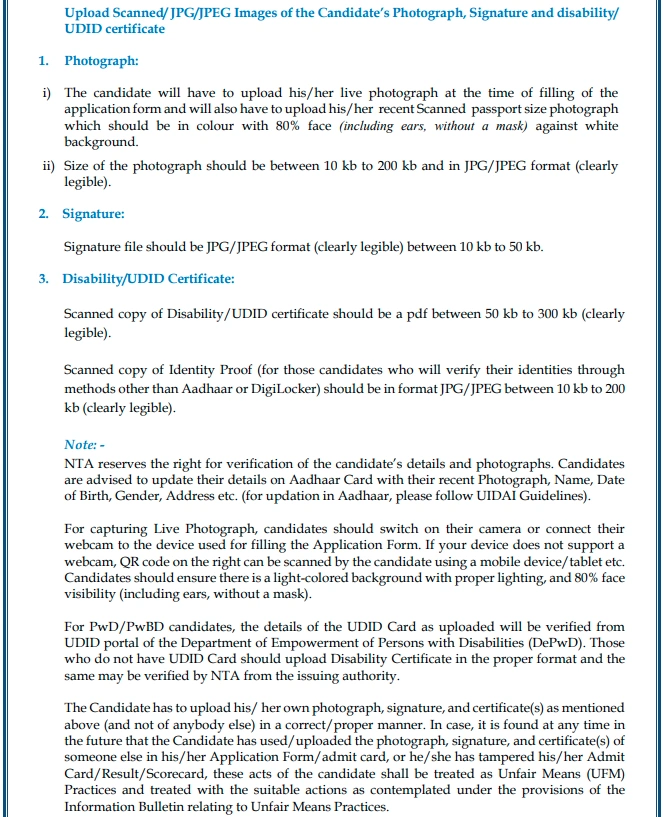
NTA has specified the exact dimensions, size, and format for documents to be uploaded in the CUET UG 2026 application form. Follow these specifications carefully:
| Document | Dimensions | File Size | Resolution | File Format |
|---|---|---|---|---|
| Photograph | 200 x 230 pixels | 10 KB to 200 KB | 200 dpi | JPG/JPEG |
| Signature | 140 x 60 pixels | 10 KB to 50 KB | 200 dpi | JPG/JPEG |
👉 Also Check - CUET UG 2026 Advisory Released by NTA: Important Notice for Aspirants
CUET UG 2026: Photo Specifications
The photograph you upload must meet the following requirements:
Photograph Guidelines:
- Recent colour passport-size photograph
- White or light-coloured background
- Face should cover 80% of the photograph
- Clear and sharp image without blur
- No cap, goggles, or dark glasses allowed
- Spectacles are allowed if worn regularly
- Religious headwear is permitted
- Dimensions: 200 x 230 pixels
- File size: 10 KB to 200 KB
- Format: JPG or JPEG only
👉 Also Check - CUET UG 2026: NTA Releases New Guidelines on Aadhaar, UDID & Document Submission
CUET UG 2026: Signature Specifications
Your signature must follow these guidelines:
Signature Guidelines:
- Sign on white paper with black ink pen
- Signature should be clear and legible
- Don't use capital letters for signature
- Dimensions: 140 x 60 pixels
- File size: 10 KB to 50 KB
- Format: JPG or JPEG only
CUET UG 2026: Address Proof Documents
For address verification, candidates can use any of the following documents:
| S.No. | Document Name |
|---|---|
| 1 | Aadhaar Card |
| 2 | Ration Card |
| 3 | Passport |
| 4 | Voter ID Card |
| 5 | Domicile Certificate |
| 6 | Electricity/Water Bill |
| 7 | Bank Passbook |
How to Scan Documents for CUET UG 2026?
Not everyone has a scanner at home. Here's how you can scan documents using your smartphone:
Step 1: Go to Play Store (Android) or App Store (iOS) on your phone.
Step 2: Search for "Document Scanner" in the search bar.
Step 3: Choose an app with high ratings and download it. Popular options include CamScanner, Adobe Scan, and Microsoft Lens.
Step 4: Open the app and place your document in a well-lit area.
Step 5: Use the app to capture the image of your document.
Step 6: Crop and adjust the image if needed.
Step 7: Save the document in JPG or JPEG format as specified by NTA.
How to Resize Documents for CUET UG 2026?
Sometimes scanned documents don't match NTA's specifications. Here's how to adjust them:
To Adjust File Size:
Open any web browser and search for "Image resizer online." Choose any free tool like iLoveIMG, ResizeImage.net, or TinyPNG. Upload your image and adjust the size as per NTA specifications.
To Convert File Format:
Search for "JPG to JPEG converter" or "PNG to JPG converter" in your browser. Upload the file and convert it to the required format. Download the converted file.
To Compress PDF or Image:
Search for "Image compressor online" or "PDF compressor." Upload your file and compress it to reduce the file size. Download the compressed file and check if it meets the specifications.
How to Upload Documents in CUET UG 2026 Application Form?
Follow these steps to upload documents in the CUET UG 2026 application:
Step 1: Visit the official NTA CUET website at cuet.nta.nic.in.
Step 2: Log in using your registered email ID and password.
Step 3: Go to the "Upload Documents" section in the application form.
Step 4: Click on "Choose File" to select the document from your device.
Step 5: Make sure the document matches the required specifications before uploading.
Step 6: Upload the photograph first, then the signature.
Step 7: Preview the uploaded documents to check clarity.
Step 8: Click on the "Submit" button to complete the upload process.
Step 9: Proceed to the next section of the application form.
CUET UG 2026: Documents Required for Different Categories
For General Category Candidates:
| Document | Required |
|---|---|
| Passport Size Photograph | Yes |
| Signature | Yes |
| Class 10 Marksheet | Yes |
| Class 12 Marksheet | Yes |
| ID Proof | Yes |
| Category Certificate | No |
For SC/ST/OBC/EWS Category Candidates:
| Document | Required |
|---|---|
| Passport Size Photograph | Yes |
| Signature | Yes |
| Class 10 Marksheet | Yes |
| Class 12 Marksheet | Yes |
| ID Proof | Yes |
| Category Certificate | Yes |
| Income Certificate (for EWS) | Yes |
For PwBD Category Candidates:
| Document | Required |
|---|---|
| Passport Size Photograph | Yes |
| Signature | Yes |
| Class 10 Marksheet | Yes |
| Class 12 Marksheet | Yes |
| ID Proof | Yes |
| PwBD Certificate | Yes |
| Scribe Declaration (if applicable) | Yes |
CUET UG 2026: Common Document Upload Mistakes to Avoid
Many candidates face issues while uploading documents. Here are common mistakes to avoid:
Don't Upload:
- ❌ Blurry or unclear photographs
- ❌ Photographs with coloured backgrounds
- ❌ Signature in pencil or coloured ink
- ❌ Documents in wrong format (PNG instead of JPG)
- ❌ Oversized or undersized files
- ❌ Cropped or incomplete documents
- ❌ Old photographs (use recent photos only)
Do Upload:
- ✅ Clear and recent passport-size photograph
- ✅ Signature on white paper with black ink
- ✅ Documents in JPG/JPEG format
- ✅ Files within the specified size limit
- ✅ Properly scanned and clear documents
CUET UG 2026: Documents Checklist
Before starting the application process, check if you have all these documents ready:
| S.No. | Document | Status |
|---|---|---|
| 1 | Valid Mobile Number | ☐ |
| 2 | Active Email ID | ☐ |
| 3 | Passport Size Photograph | ☐ |
| 4 | Scanned Signature | ☐ |
| 5 | Class 10 Marksheet | ☐ |
| 6 | Class 12 Marksheet/Admit Card | ☐ |
| 7 | Government ID Proof | ☐ |
| 8 | Category Certificate (if applicable) | ☐ |
| 9 | PwBD Certificate (if applicable) | ☐ |
| 10 | Banking Details for Fee Payment | ☐ |
CUET UG 2026: Key Points to Remember
Candidates applying for CUET UG 2026 must keep all required documents ready before registration. The photograph should be recent, clear, and in JPG/JPEG format with dimensions of 200 x 230 pixels. The signature must be in black ink on white paper with dimensions of 140 x 60 pixels.
Class 10 and Class 12 marksheets are mandatory for all candidates. Reserved category candidates must have valid category certificates. Documents should be scanned properly and saved in the correct format.
If documents don't meet specifications, the application form may be rejected. Use online tools to resize and convert documents if needed. Upload documents carefully and preview before final submission.
-




 Home
Home
 Quiz
Quiz
 Short News
 Web Story
 Get latest Exam Updates







