




 Sign in


 Profile
 Signout
CUET UG Registration 2026: How to Apply Online & Eligibility- Complete Guide


CUET UG 2026 Registration: The National Testing Agency (NTA) has released the CUET UG 2026 application form on January 3, 2026. Candidates can fill and submit the application form before the deadline on January 30, 2026. The registration process is completely online and can be completed at the official website cuet.nta.nic.in.
Candidates need to provide their personal, academic, and contact information in the CUET UG 2026 application form. Before submission, it's important to verify that all information is accurate and matches the supporting documents. If you forget your application number or password, you can recover them through the NTA portal.
👉 Also Check - CUET UG 2026: Registration Direct Link to Apply Online
👉 Also Check - CUET UG 2026 Documents Required for Registration- Check Complete List Here
👉 Also Check - CUET UG 2026 Notification (Out): Application Form, Important Dates & Eligibility- Complete Details
👉 Also Check - CUET 2026 Major Changes New Syllabus Pattern NTA Latest Update, Details Here
CUET UG 2026 Registration: Key Highlights
| Details | Information |
|---|---|
| Exam Name | Common University Entrance Test (CUET UG) 2026 |
| Conducting Body | National Testing Agency (NTA) |
| Registration Start Date | January 3, 2026 |
| Application Last Date | January 30, 2026 |
| Fee Payment Last Date | January 31, 2026 |
| Correction Window | February 2-4, 2026 |
| Official Website | cuet.nta.nic.in |
CUET UG 2026: Who Can Apply? (Eligibility Criteria)
Before starting the registration process, candidates must check if they meet the eligibility criteria:
Educational Qualification
Candidates must have passed Class 12 or equivalent examination from a recognized board. Students who are appearing in Class 12 final exams in 2026 are also eligible to apply. There's no minimum percentage requirement to appear for CUET UG.
Age Limit
There's no upper age limit for appearing in CUET UG 2026. Candidates of any age can apply for the examination. However, individual universities may have their own age requirements for admission.
Number of Attempts
There's no restriction on the number of attempts. Candidates can appear for CUET UG multiple times as long as they meet the basic eligibility criteria.
👉 Also Check - CUET UG 2026: NTA Releases New Guidelines on Aadhaar, UDID & Document Submission
CUET UG 2026: Steps to Fill Application Form
Here's a quick overview of the application process:
| Step | Description |
|---|---|
| Step 1 | Registration |
| Step 2 | Fill Application Form |
| Step 3 | Choose Test Center |
| Step 4 | Choose University & Program |
| Step 5 | Choose Test Paper/Subjects |
| Step 6 | Upload Photo & Signature |
| Step 7 | Pay Application Fee |
Documents Required for CUET UG 2026 Registration
Before starting the application process, keep these documents ready:
- ✅ Valid Mobile Number
- ✅ Active Email ID
- ✅ Scanned copy of recent passport-size photograph
- ✅ Scanned copy of signature (black ink)
- ✅ Class 10th Marksheet (scanned copy)
- ✅ Class 12th Marksheet or Admit Card (scanned copy)
- ✅ Photo ID Proof (Aadhaar, PAN, Voter ID, Passport, Ration Card, or Bank Passbook)
- ✅ Category Certificate (if applicable)
- ✅ Banking details for fee payment (Debit Card/Credit Card/Net Banking)
How to Fill CUET UG 2026 Application Form? (Step-by-Step Guide)
Step 1: Registration Process
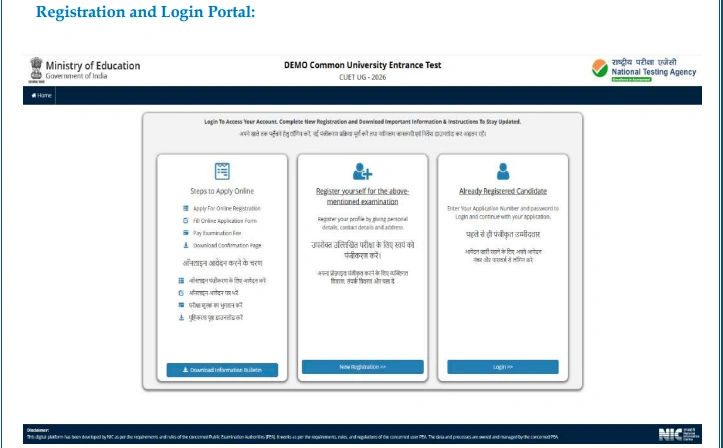
Visit the Official Website
Open your web browser and go to the official CUET website at cuet.nta.nic.in. Click on the "Registration" button on the homepage.
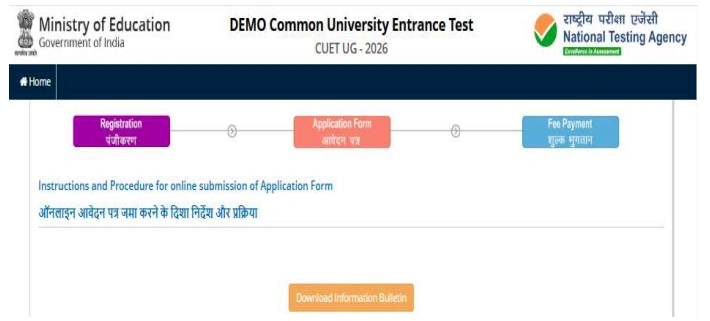
Read Instructions Carefully
Read the given instructions carefully to understand how to fill the application form. Mark the declaration checkbox and click on "Click here to Proceed."
Fill Personal Information
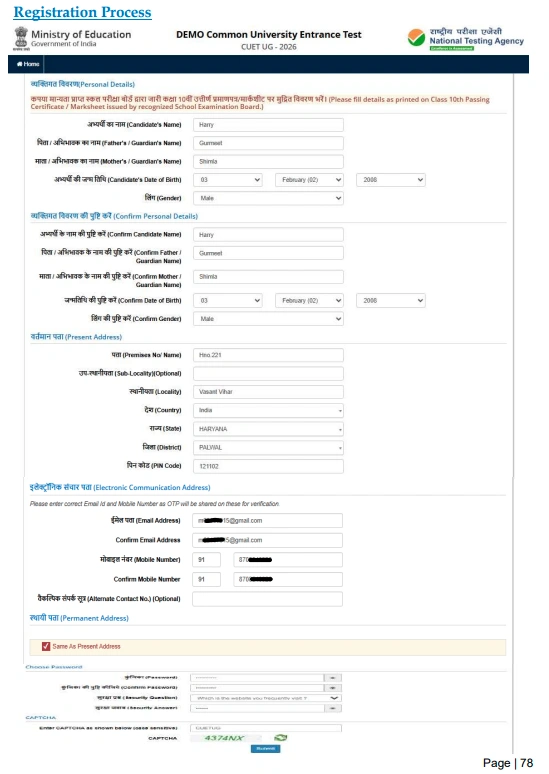
The registration form will appear on your screen. Fill in your personal information in the first section. This includes:
- Candidate's Name
- Date of Birth
- Father's Name
- Mother's Name
- Gender
- Nationality
- Identification Document Details
Enter Address Details
Enter your current address and mobile number. If your permanent address is the same as your current address, check the box. Otherwise, enter your permanent address separately.
Create Password
Create a strong password with 8 to 13 characters. Your password must include:
- One uppercase letter
- One lowercase letter
- One number
- One special character
For example: Test@123
Confirm the password by entering it again. Select a security question and provide your answer.
Submit Registration
Enter the security pin shown on the screen and click "Submit" to complete the registration process.
Verify OTP
An OTP will be sent to your registered mobile number. Enter the OTP and security pin, then click "Submit."
Save Application Number
After successful registration, your application number will be displayed on the screen. You'll also receive it on your registered email ID. Save this number safely – you'll need it for future logins.
Step 2: Fill the Application Form
Login to Your Account
Visit cuet.nta.nic.in and login using your application number and password.
Fill Personal Details
Some personal details will be pre-filled from the registration form. Review them and make changes if needed. Fill in any additional personal information required.
Select Quota & Category
If you belong to any reserved category (SC/ST/OBC/EWS/PwBD), select "Yes" and provide the required details. If not, select "No."
Review and Save
Review all the personal details you've entered. Click "Save" to proceed or "Back" to make changes.
Step 3: Fill Education Details
Enter Class 10th Details
Provide your Class 10th qualification details including:
- Board Name
- Year of Passing
- Roll Number
- School Name
- Percentage/CGPA
Enter Class 12th Details
Provide your Class 12th qualification details including:
- Board Name
- Year of Passing (or Appearing)
- Roll Number
- School Name
- Percentage/CGPA (if passed)
- Stream/Subjects
Review and Save
Review all education details and click "Save" to proceed. You can click "Back" to make any changes.
Step 4: Select Examination Center
Choose Exam Centers
You need to select 2 exam centers as per your convenience. Choose cities that are easily accessible for you.
Save Selection
After selecting your preferred exam centers, click "Save" to confirm your choices.
Review and Proceed
Review the selected exam centers. Click "Update Examination Centre Form" to make changes or "Proceed to Next Section" to continue.
Step 5: Select University and Program
Choose University
Select the university where you want to take admission from the dropdown list. CUET score is accepted by 250+ universities.
Choose Program
Select your preferred program/course offered by the university. Click "Add" to add the university-program combination to your list.
Add Multiple Choices
You can add multiple university-program combinations. If you want to remove any selection, click "Remove."
Review and Proceed
Review your selected universities and programs. Click "Update Program Form" to make changes or "Proceed to Next Section" to continue.
Step 6: Select Test Papers/Subjects
Read Selection Guidelines
Read the subject selection guidelines carefully. Check the table to see how many subjects you can choose from each section.
Choose Subjects
Select a maximum of 5 subjects from all three sections:
- Section IA: 13 Languages
- Section IB: 20 Languages
- Section II: 27 Domain-Specific Subjects
- Section III: General Test
Confirm Selection
After choosing your subjects, mark the confirmation checkbox and click "Save."
Review and Proceed
Review your selected subjects. Click "Proceed to Next Section" to continue.
Step 7: Upload Documents
Upload Photograph
Click "Choose File" and select your passport-size photograph. Make sure it meets the specifications:
| Specification | Requirement |
|---|---|
| Dimensions | 200 x 230 pixels |
| File Size | 10 KB to 200 KB |
| Resolution | 200 dpi |
| Format | JPG/JPEG |
Upload Signature
Click "Choose File" and select your scanned signature. Specifications:
| Specification | Requirement |
|---|---|
| Dimensions | 140 x 60 pixels |
| File Size | 10 KB to 50 KB |
| Resolution | 200 dpi |
| Format | JPG/JPEG |
Upload Class 10th Document
Upload a scanned copy of your Class 10th marksheet for date of birth verification.
Start Upload
After selecting all documents, click "Start Upload" to upload them. Click "Cancel" to remove and re-select documents.
Proceed to Preview
Once all documents are uploaded successfully, click "Proceed to Preview Section."
Step 8: Review Application Form
Check All Details
Review all the details mentioned in every section of the application form:
- Personal Details
- Educational Details
- Examination Centers
- University & Program Selection
- Subject Selection
- Uploaded Documents
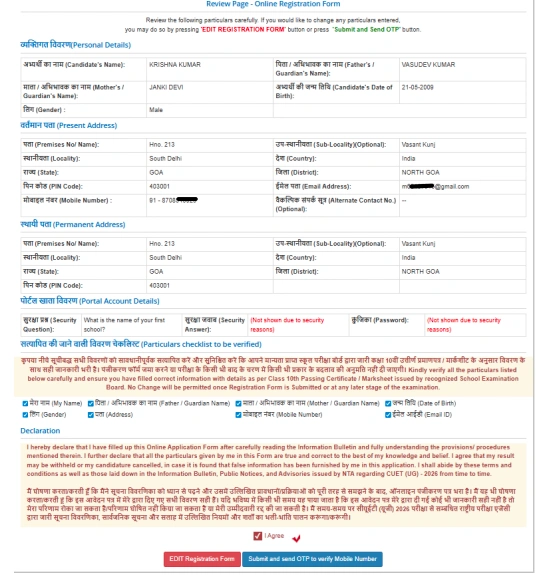
Verify and Declare
At the end of the form, verify the specific details by marking the checkboxes next to each declaration.
Confirm Email ID
Enter your email ID again to confirm it. A verification code will be sent to your email. Enter the code and click "Verify."
Proceed to Payment
After verification, click "Proceed to Payment" to pay the application fee.
Step 9: Pay Application Fee
Check Fee Amount
Review the fee amount based on your category and number of subjects selected.
| Category | Fee (Up to 3 Subjects) | Additional Subject |
|---|---|---|
| General | ₹1,000 | ₹400 |
| OBC / EWS | ₹900 | ₹375 |
| SC / ST / PwBD | ₹800 | ₹350 |
| Outside India | ₹4,500 | ₹1,800 |
Select Payment Gateway
Choose your preferred payment gateway:
- SBI
- Canara Bank
- ICICI Bank
- Paytm
Complete Payment
Click "Pay Now" and provide the required payment details. Complete the payment using Credit Card, Debit Card, Net Banking, or UPI.
Download Receipt
After successful payment, click "Confirm" to get the fee payment receipt. Download and save the receipt safely.
Download Application Form
Click "Download" to download your completed application form. Keep a printout for future reference.
CUET UG 2026: Application Fee Structure
| Category | Up to 3 Subjects | Each Additional Subject |
|---|---|---|
| General (UR) | ₹1,000 | ₹400 |
| OBC (NCL) / EWS | ₹900 | ₹375 |
| SC / ST / PwBD / Third Gender | ₹800 | ₹350 |
| Centers Outside India | ₹4,500 | ₹1,800 |
Payment Mode: Credit Card, Debit Card, Net Banking, UPI
CUET UG 2026: Application Form Correction
NTA will provide a correction facility to edit the CUET UG 2026 application form from February 2 to 4, 2026. During this window, candidates can make changes to their:
- Personal Details
- Educational Details
- Subject Selection
- University & Program Selection
Important: Verify all information from your certificates and marksheets before making any changes. Some fields may not be editable even during the correction window.
CUET UG 2026: How to Recover Forgot Password/Application Number?
If you forget your CUET application number or password, follow these steps:
To Recover Application Number:
- Visit cuet.nta.nic.in
- Click on "Forgot Application Number"
- Enter your registered email ID and date of birth
- Your application number will be sent to your email
To Reset Password:
- Visit cuet.nta.nic.in
- Click on "Forgot Password"
- Enter your application number and registered email ID
- Follow the instructions to reset your password
CUET UG 2026: Key Points to Remember
NTA has released the CUET UG 2026 application form on January 3, 2026. The last date to apply is January 30, 2026. Candidates must fill personal, educational, and contact details accurately.
You can choose up to 5 subjects from all sections. Application fee varies from ₹800 to ₹1,000 based on category for up to 3 subjects. The correction window will be open from February 2-4, 2026.
Keep all documents ready before starting registration. Photo size should be 200 x 230 pixels and signature 140 x 60 pixels. Download and save the confirmation page after successful submission.
-




 Home
Home
 Quiz
Quiz
 Short News
 Web Story
 Get latest Exam Updates







